Posts

Showing posts with the label Vista

Cleaning Notification Area Icons in Vista/Windows 7

Image
Just thought I would quickly post a little tip on how to clean your notification items from Windows Vista/7.. What are Notification Area Icons? In Vista/7 you have the ability to control how items in the taskbar tray are displayed (hidden, always shown etc). This list can actually get rather bloated, especially for us developers when we are building applications that sit in the tray (you actually end up getting two entries, one for the debug, one for the release). So, you may find it is getting a bit unmanageable and want to give it a clean. NOTE: This will remove ALL entries from the list – including settings you may/will want to keep! You will therefore need to reconfigure items that you want to always show in the tray etc. Some people may be asking “why not just use the reset link provided?” – Well, it doesn’t clean, it just resets. So if you have many icons that you have previously set to “Always Show” and then deleted. They will just revert back to “Hide/Only Show ...


CS0016 Error on ASP.NET, IIS7 and Windows Vista - SOLVED

Image
So, I was messing with some ideas for site structure and security, and it came to my deploying the site to IIS. Now, I admit, I am still pretty new to IIS7 and Windows Vista (Home Premium), so I was expecting some issues, but this was kicked my ass for a good 45 mins ! Once I had deployed my site and browsed to it, I was getting the following error: CS0016: Could not write to output file 'c:\Windows\Microsoft.NET\Framework\v2.0.50727\Temporary ASP.NET Files\… ‘Access is denied.’ (Where … is the randomly-generated DLL names created by ASP.NET ). So, I figured, “OK this is probably a permissions issue” as I have encountered similar before in XP, where the ASPNET user account needed to be added. I also know that in Vista this account is called “NETWORK SERVICE” . I then update the permissions for the “Temporary ASP.NET Files” folder in the .NET Framework folder, eagerly get back to my browser, hit F5.. Boom. No dice, same error message. After doing some digging on th...

The Ultimate Pro-Vista Argument EVER!

Image
While the usual thoughts were flying around between us geek's on Twitter , Windows Vista came up. Basically the general theme was "we don't know why the haters hate it so much, we have no problems and enjoy working with it". I replied to a tweet from Jeff Atwood @ CodingHorror with this, which did make me chuckle to myself after sending: Top that haters! :D Share:   digg it! |  del.icio.us |  furl |  Live |  Technorati |  Facebook

Vista Speech Recognition Macros CTP Released

Image
This has been sat in my Inbox for a while as I have yet to play with it, but I thought I should at least do my bit to spread the word, this could be an exciting bit of technology depending on how well it works! Microsoft released the Community Technology Preview (CTP) for Windows Speech Recognition Macros Tool (WSR Macros) on 23/04 (or 04/23 for across the pond!). You can download the CTP from here . I really like the Speech Recognition feature of Vista, contrary to popular belief, it does seem to work well, and I have a cheap crappy headset. I know Scott Hanselman uses speech recognition ( mentioned here in his post on his new home ) and he reports fantastic detection rates. With macros to perform multiple functions on key words/phrases, the possibilities are endless! Awesome! Note: This is obviously only for Windows Vista ! Links: WSR Macros Download Scott Hanselman's Blog Vista Speech Recognition Overview Share:   digg it! |  del.icio.us | ...

Vista Problem - Debugging "[Application] has stopped working"

Image
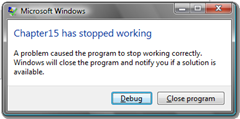
Well, it was bound to happen, and it finally has! I have found something I genuinely do not like in Vista. While working on some code while studying Code Access Security (CAS) . CAS basically allows you/your admin to control what resources .NET code has access to when running. This can be Dialog boxes, the Registry, Printing, Windows Services, Data Access, whatever, it seems pretty complete. The idea behind the exercise that I was doing was to demo " Imperative " and " Declarative " CAS. "Imperative" checks the permissions before loading the assembly/code, "Declarative" checks the permissions at run-time. So, I create a simple application that will present a FileDialog box to the user prompting to select a file. Nothing flashy. The idea is that initially the application runs OK, I then configure the CLR to restrict access to FileDialog's for the application, then the application should throw an Exception saying "I can't do that...

Vista "Unidentified Network" Issue - Revisited! [TOTALLY RESOLVED NOW!]

Image
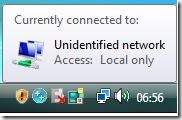
Well, I am not sure if you guys found my previous post on this, here's some [really] quick history. Brand new PC, Had for about three days, all working fine, one morning, no Internet, Vista Network and Sharing Centre is telling me I am on an "Unidentified Network". I troubleshoot as much as I can, to no avail. I contact the PC vendor, their tech support is also stumped. I send the PC back, and await a  replacement since we both write it off as a hardware failure. So, yesterday my new PC arrives! I get it set up, everything is running great, I leave it on when I go to bed to allow the drive to defrag (since I had been putting lots of software on etc.). I wake up in the morning, come to my desk, wake the computer up and BAM! "Unidentified Network". I said something that sounded very much like "You gotta be hitting me", I couldn't believe it. This time was different though, I had a lead :) So, I get the name and model of my motherboard, its ...

Vista Network Issue - "Unidentified Network" & Loss of Internet Connectivity

UPDATE: See Items in Red under "Next things to try". Ohhh Windows Vista baby, you were doing so well! Right, I logged on to my PC yesterday morning to find I had no Internet connectivity. My first port-of-call? The " Network and Sharing Centre " of course! The nice little graphic on the screen there then proceeded to tell me I was on an " Unidentified Network ". "Hmmm, that's odd" I thought. So, I think "lets fix this damn thing". I run the network diagnosis this to fix it, and I am presented with a dialog telling me that I need to reset my router - I don't really believe this, but what the hell, I reset it anyway. Still no Internet. Weird, so I then fire up the command prompt " cmd.exe " (with admin privileges) and run " ipconfig /all " to have a look at what's going on. I then see I have been assigned an APIPA address . I know this normally happens when there is a problem communicating with...